CRA Rep ID: How to Give Your Accountant Access to Your CRA Account
Your accountant calls the Canada Revenue Agency about a letter you got. The agent asks one question first: are you authorized on this account? If the answer is no, the call ends there.
That’s where a Rep ID comes in. Once you enter your accountant’s ID, or their firm’s business number, in your online CRA profile, they can see your tax information and deal with the Canada Revenue Agency (CRA) for you. It’s free and takes a few minutes, and you decide how long they keep access.
Plenty of Canadians hand their taxes to a pro. Of the 33.8 million individual returns the CRA received this filing season (as of November 1, 2026), about 60% came through EFILE, the system tax preparers use to file.
As Azim Dahya, CPA at Advanced Tax Services explains:
“Once we have access, we can see your slips, check what the CRA has on file and answer their letters for you. It takes about five minutes to set up. And if you ever want us out, you can remove us yourself in a few clicks.”
The steps below take about five minutes. If you get stuck, or you’d rather not do it online, the other options are further down.
What Is Represent a Client?
Represent a Client is the CRA’s online portal for accountants, bookkeepers and other representatives. Accountants often shorten it to RAC. Once you authorize someone, they get online access to your file and can also call, write or meet with the CRA for you.
You can also add someone who isn’t an accountant, like an adult child helping a parent keep up with CRA mail. Legal guardians, financial planners and payroll staff can register too.
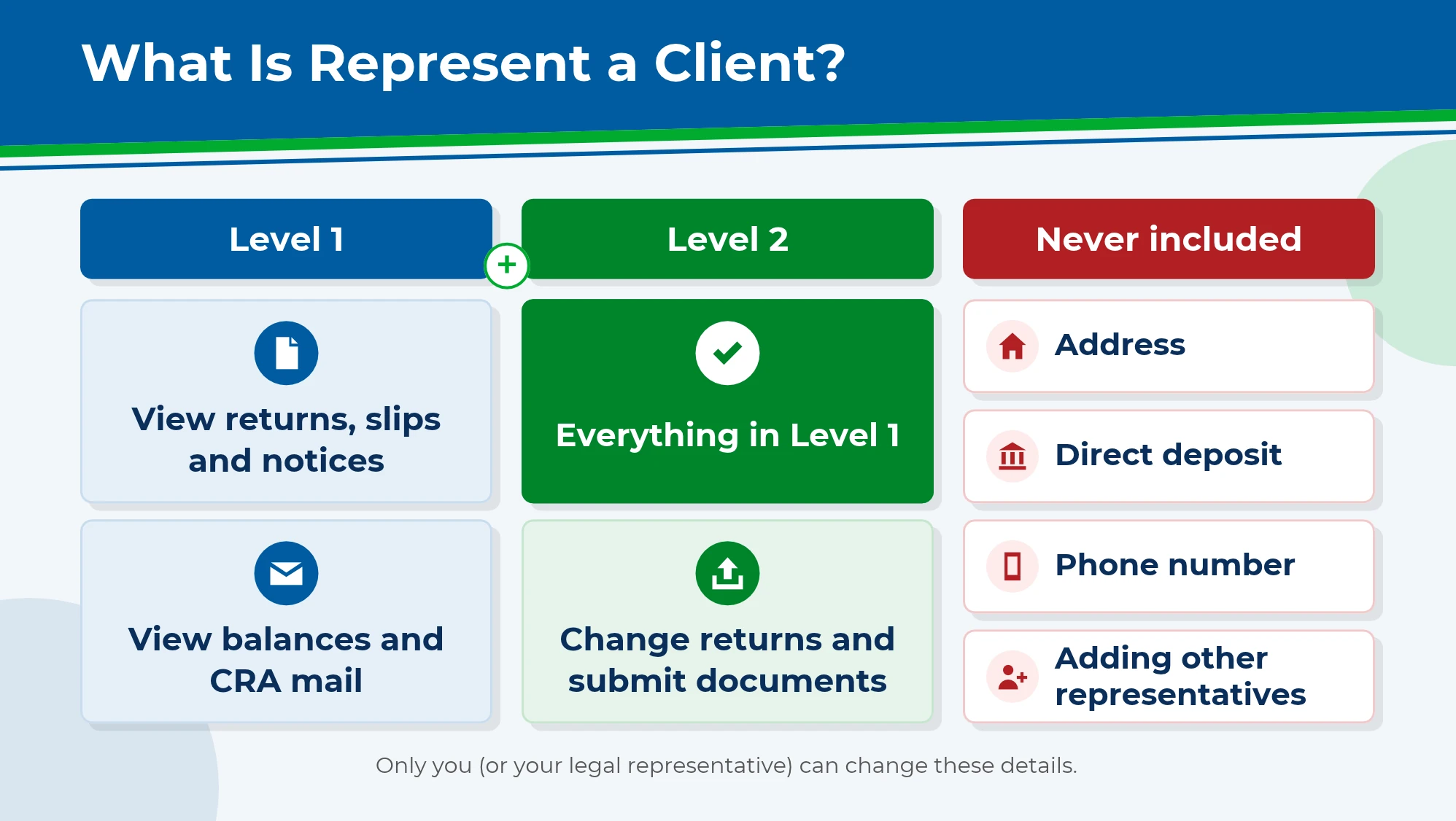
You’ll also pick how much they can do:
| Level | What your representative can do |
|---|---|
| Level 1 | View your returns, slips, notices, balances and tax mail |
| Level 2 | Everything in Level 1, plus change returns, submit documents and answer audit letters |
Most accountants ask for Level 2. According to the CRA, it lets us change a filed return, send in receipts the CRA asks for, register a formal dispute and ask for relief from penalties and interest. With Level 1, we can see your notices and slips but can’t fix anything.
At either level, a representative can’t see or change your address, banking information or phone number, or add other representatives. Those stay with you, or with a legal representative like an executor or someone holding your power of attorney.
Skip the end date. Tick “Does not expire” and the authorization stays in place until you cancel it, so there’s nothing to redo next tax season.
What Is a CRA Rep ID?
When you add someone, the CRA asks for one of three IDs. A RepID (representative identifier) is a 7-character code for one person. A GroupID is a 6-character code starting with G. A business number (BN) is the 9-digit number for a whole firm.
Since July 15, 2025, accountants can’t request access for individual clients through their tax software. Those requests now go through Represent a Client. Business clients aren’t affected.
Which one should you use? Entering a firm’s BN lets the CRA deal with anyone at that firm. That’s what we recommend, so whoever on our team picks up your file can help. Here’s ours:
Advanced Tax Services BN: 855879284
How to Add a Representative to My CRA Account
The quickest way is through your own CRA account. If you can sign in, you can add us in about five minutes, and our access starts right away. Here’s exactly what to click.
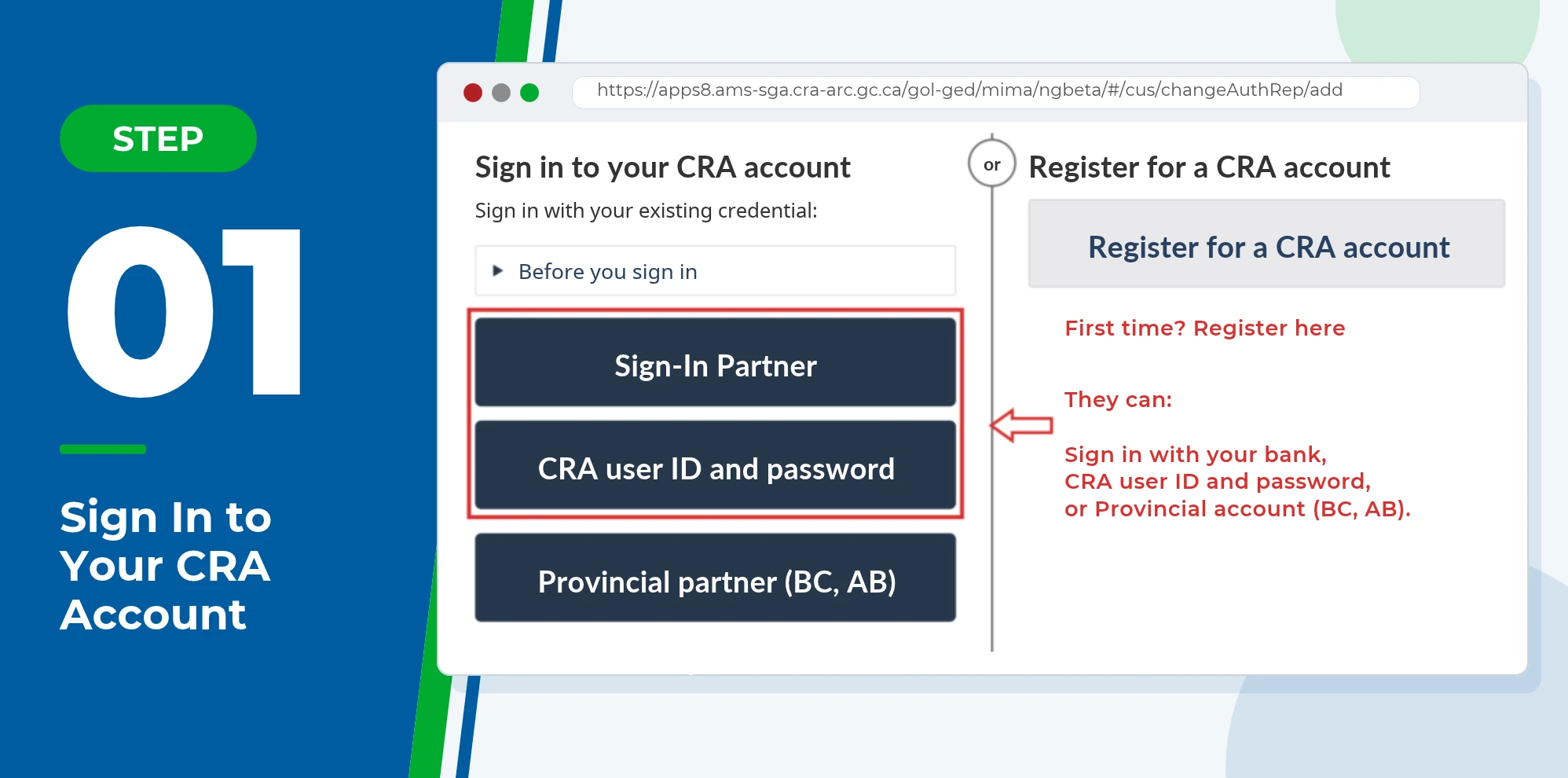
Step 1: Sign In with Your CRA User ID and Password
Sign in to My Account for your personal taxes, or My Business Account for a business. Use your CRA user ID and password, or a Sign-In Partner such as your bank.
Setting up a CRA account for the first time? You’ll need to register for My Account before you can add us. When you register, you’ll create a CRA user ID, choose security questions and enter your social insurance number plus amounts from a recent tax return.
The CRA mails you a security code to finish signing up. If you don’t want to wait, you can verify your identity online with photo ID instead. Already registered but locked out? The CRA’s sign-in help page can recover your user ID or password.
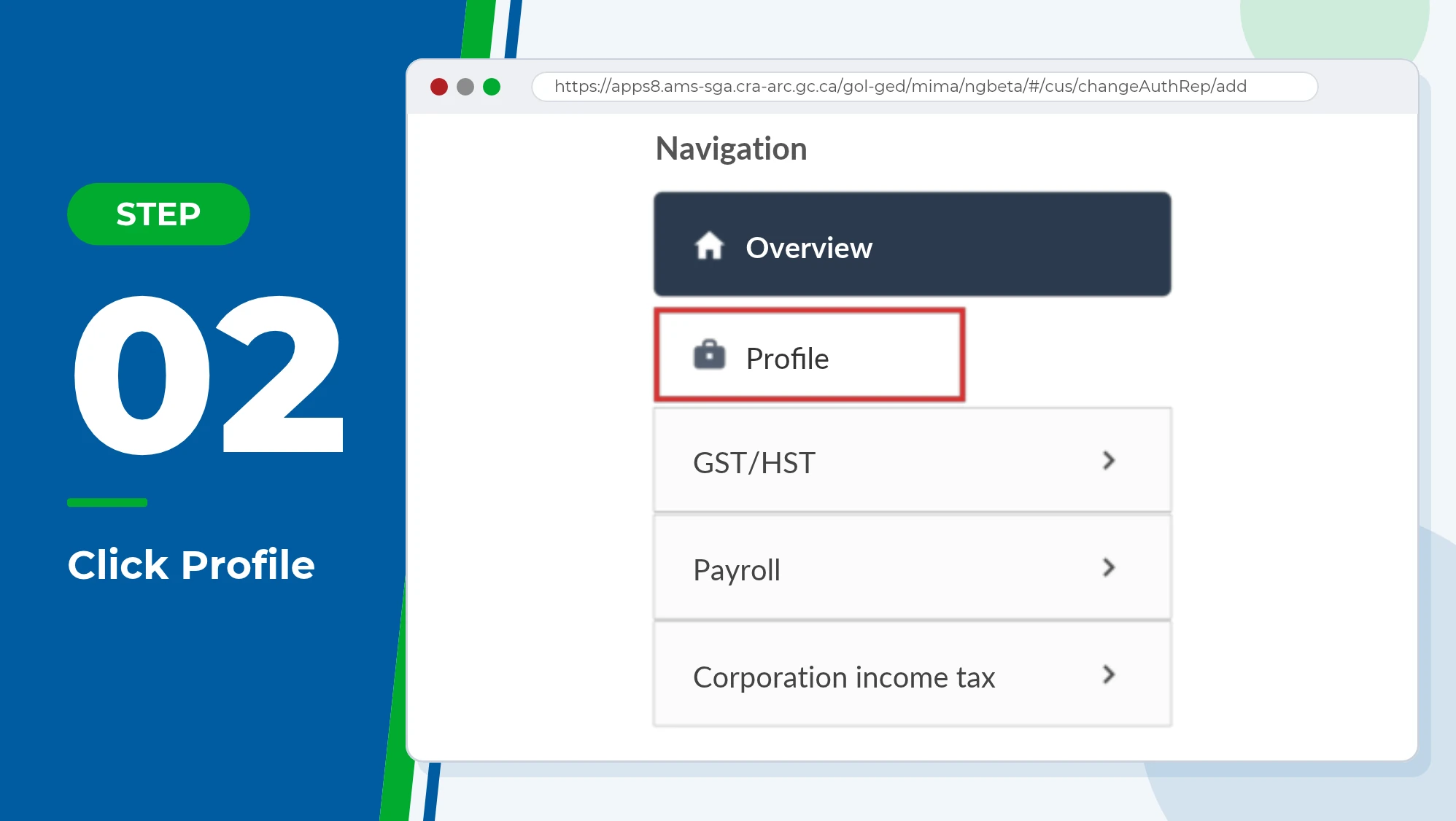
Step 2: Click “Profile”
You’ll land on your account’s home page. Click Profile in the menu on the left.
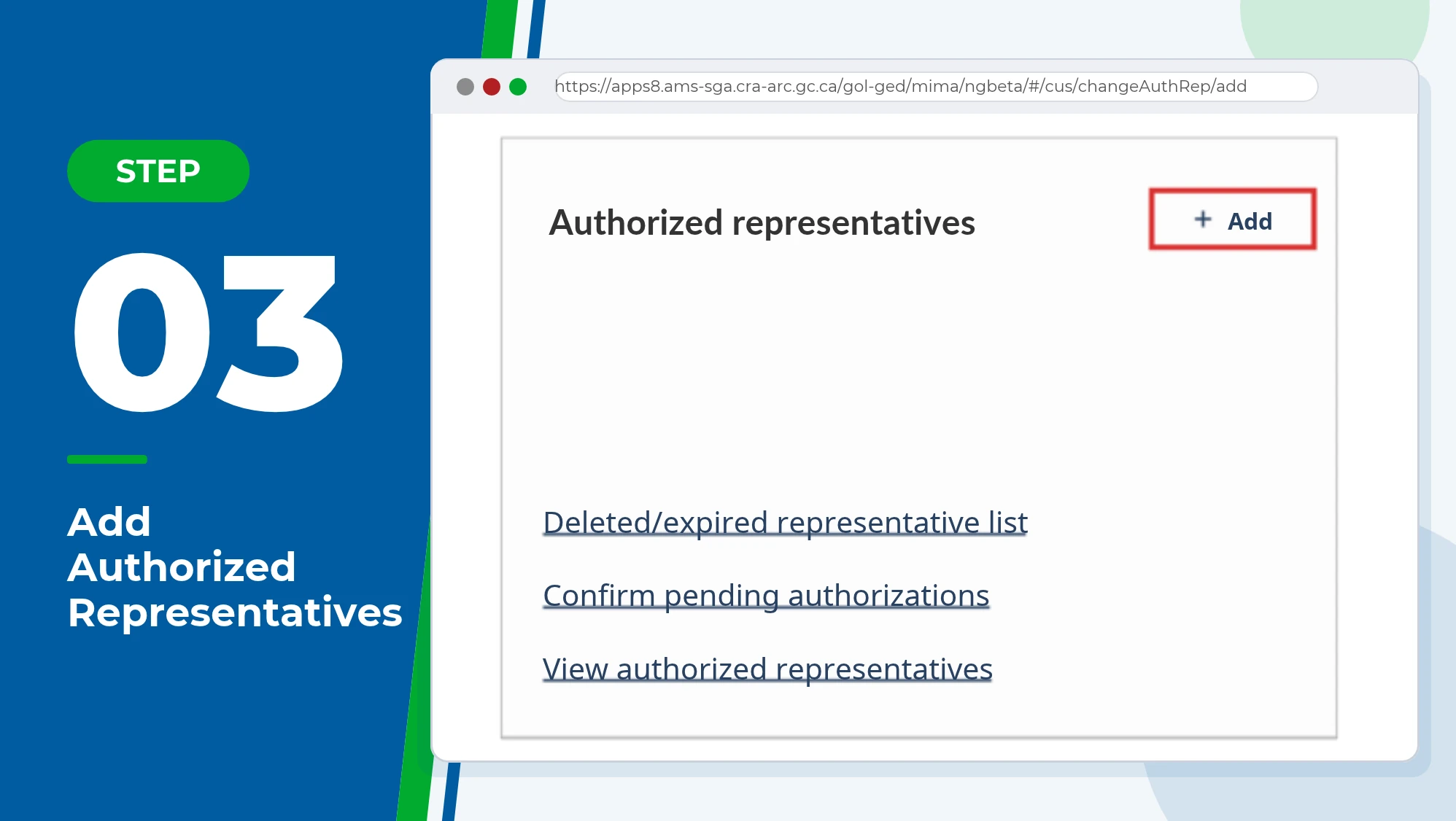
Step 3: Find “Authorized Representatives” and Click “Add”
On your Profile page, find the box titled Authorized representatives and click Add.
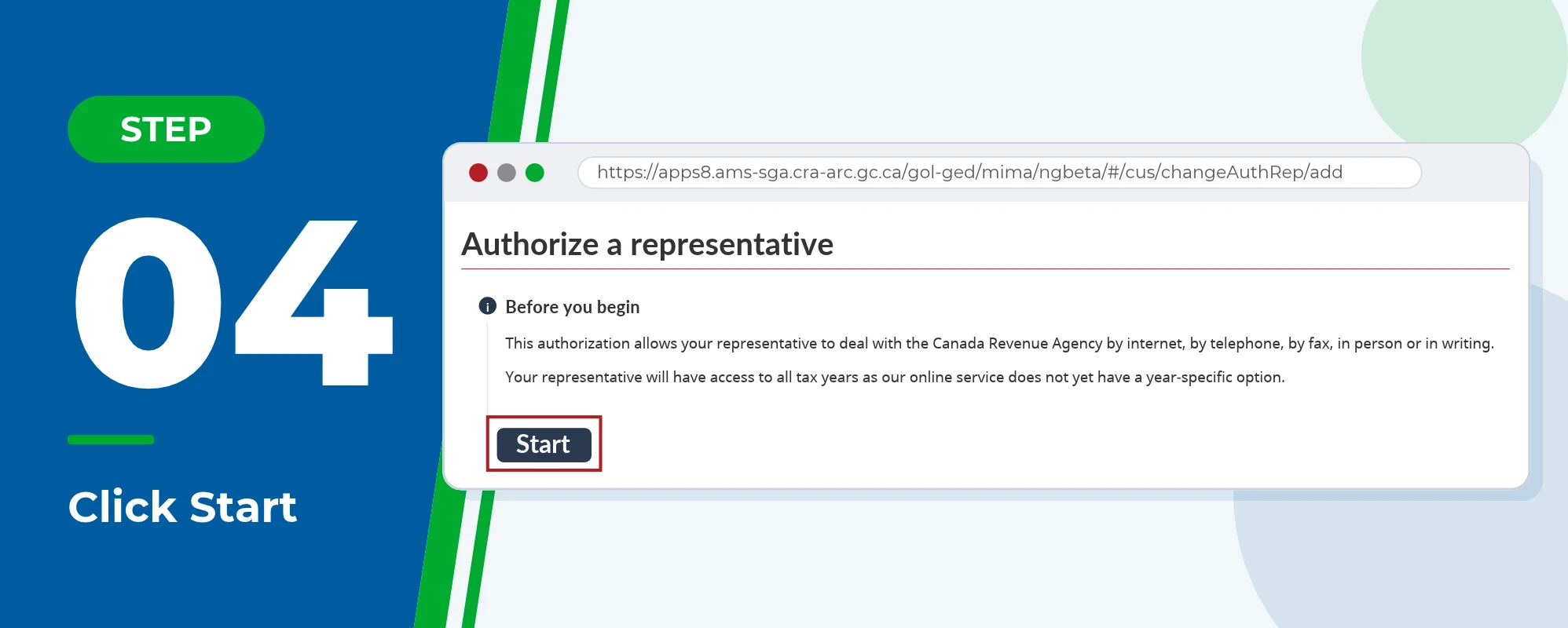
Step 4: Click “Start”
Read the short “Before you begin” note, then click Start.
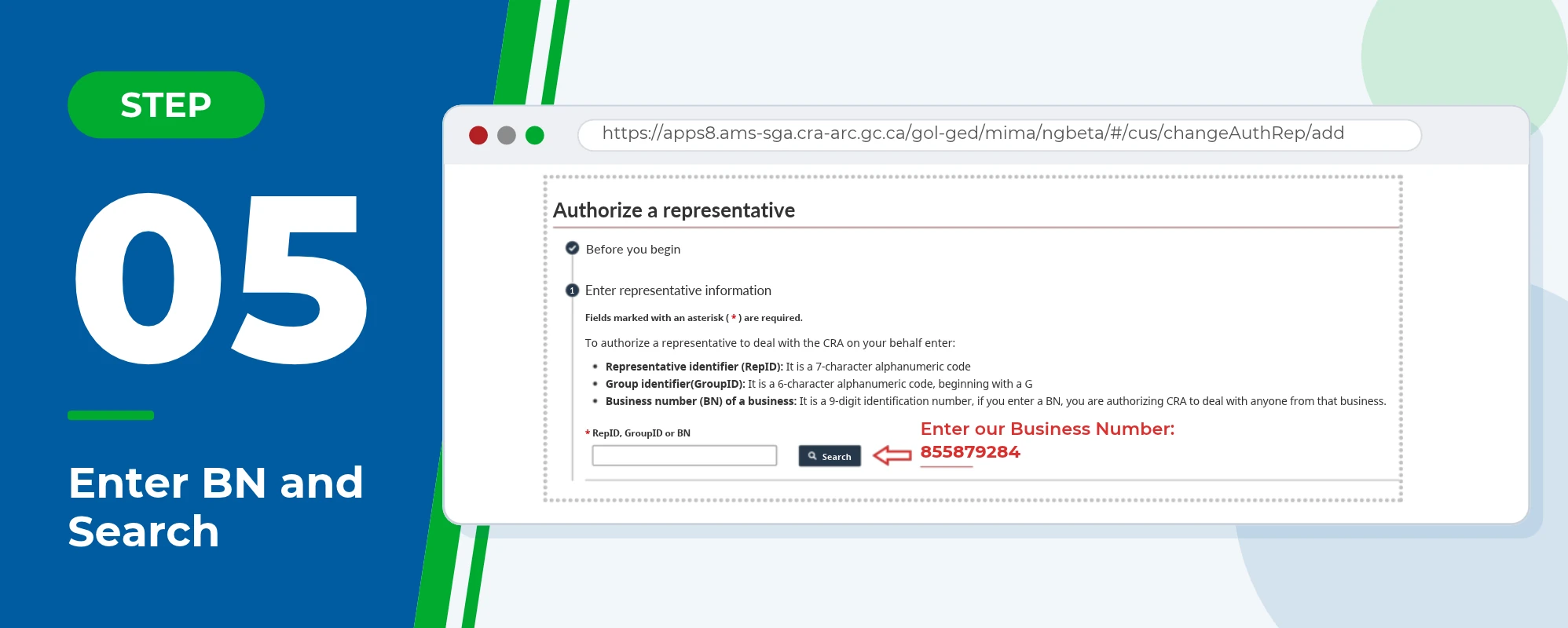
Step 5: Enter Our Business Number and Click “Search”
In the RepID, GroupID or BN box, enter our business number, 855879284, and click Search.
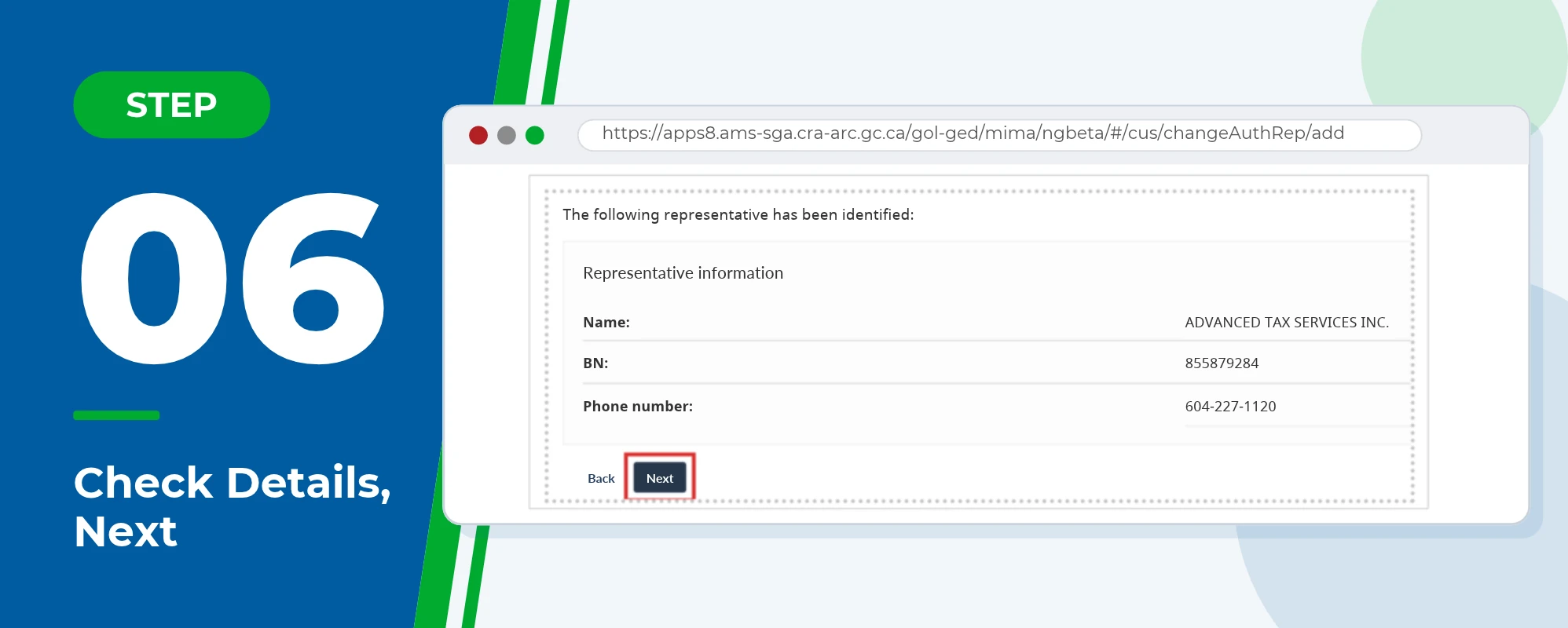
Step 6: Check Our Details and Click “Next”
You’ll now see the representative found. Make sure it shows ADVANCED TAX SERVICES INC., BN 855879284, and our number, 604-227-1120. Then click Next.
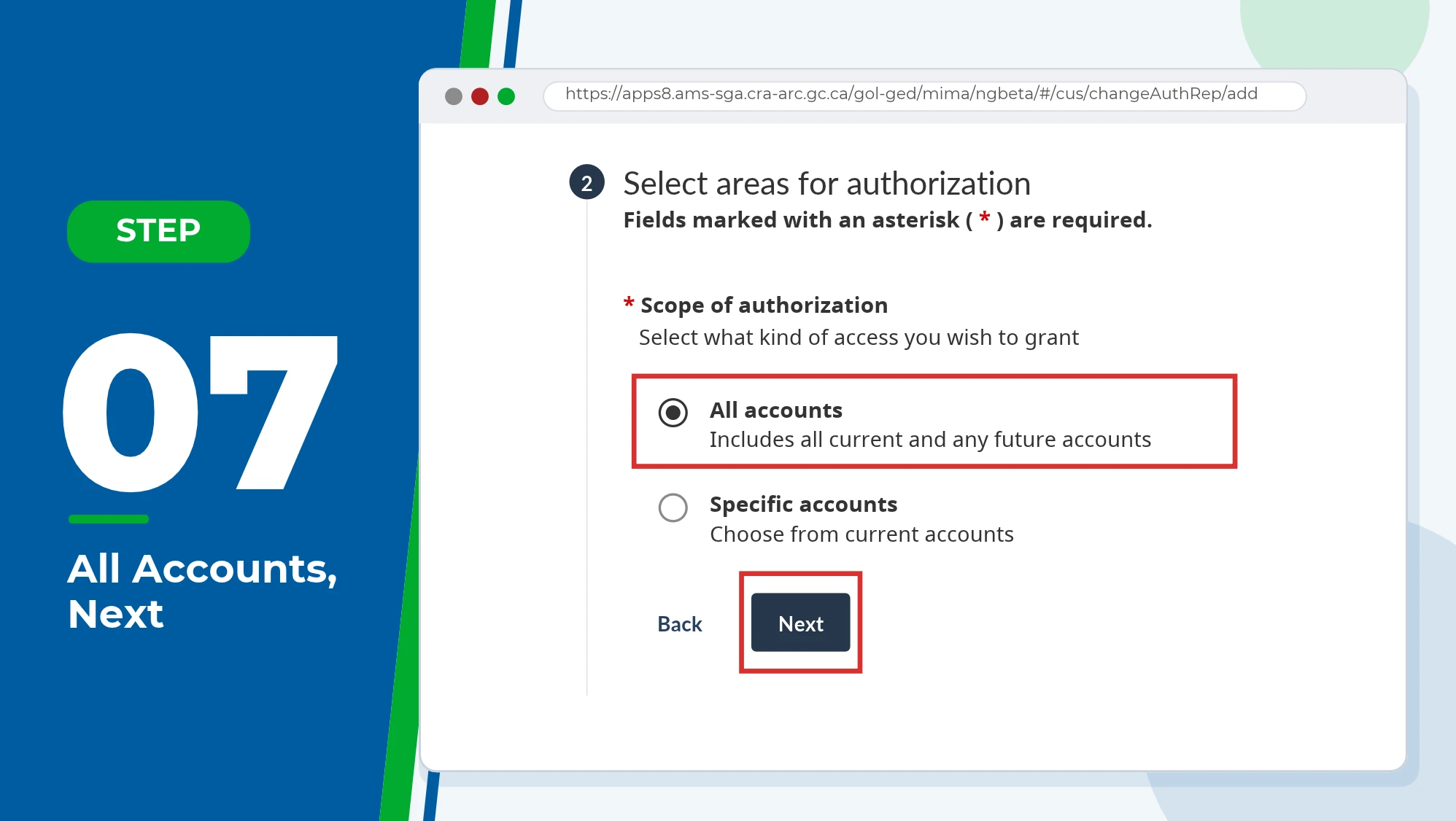
Step 7: Select “All Accounts” and Click “Next”
Under Scope of authorization, tick All accounts, which includes all current and any future accounts. Scroll to the bottom and click Next.
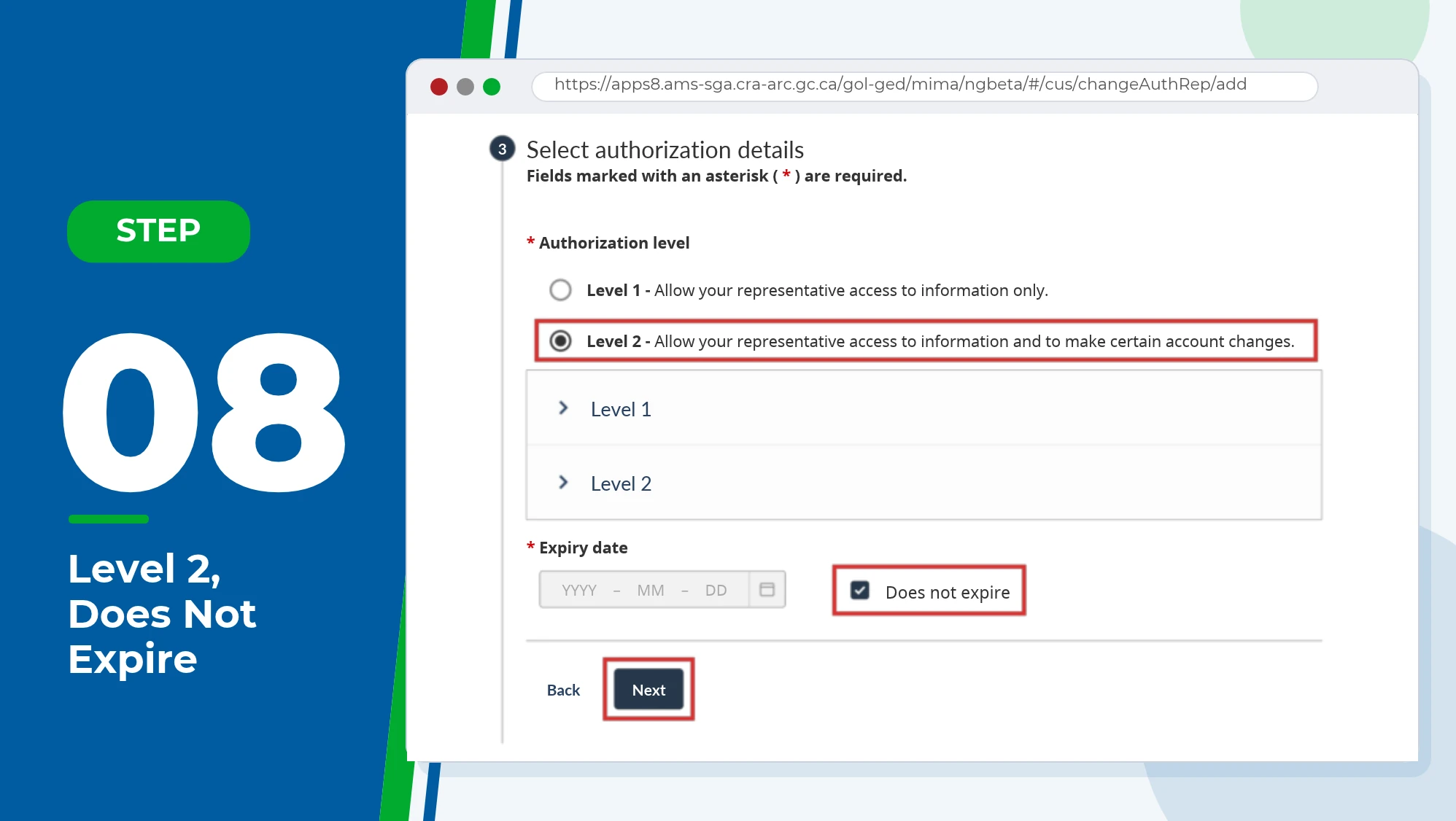
Step 8: Choose Level 2 and “Does Not Expire”
Under Authorization level, pick Level 2. Further down, tick Does not expire, then click Next.
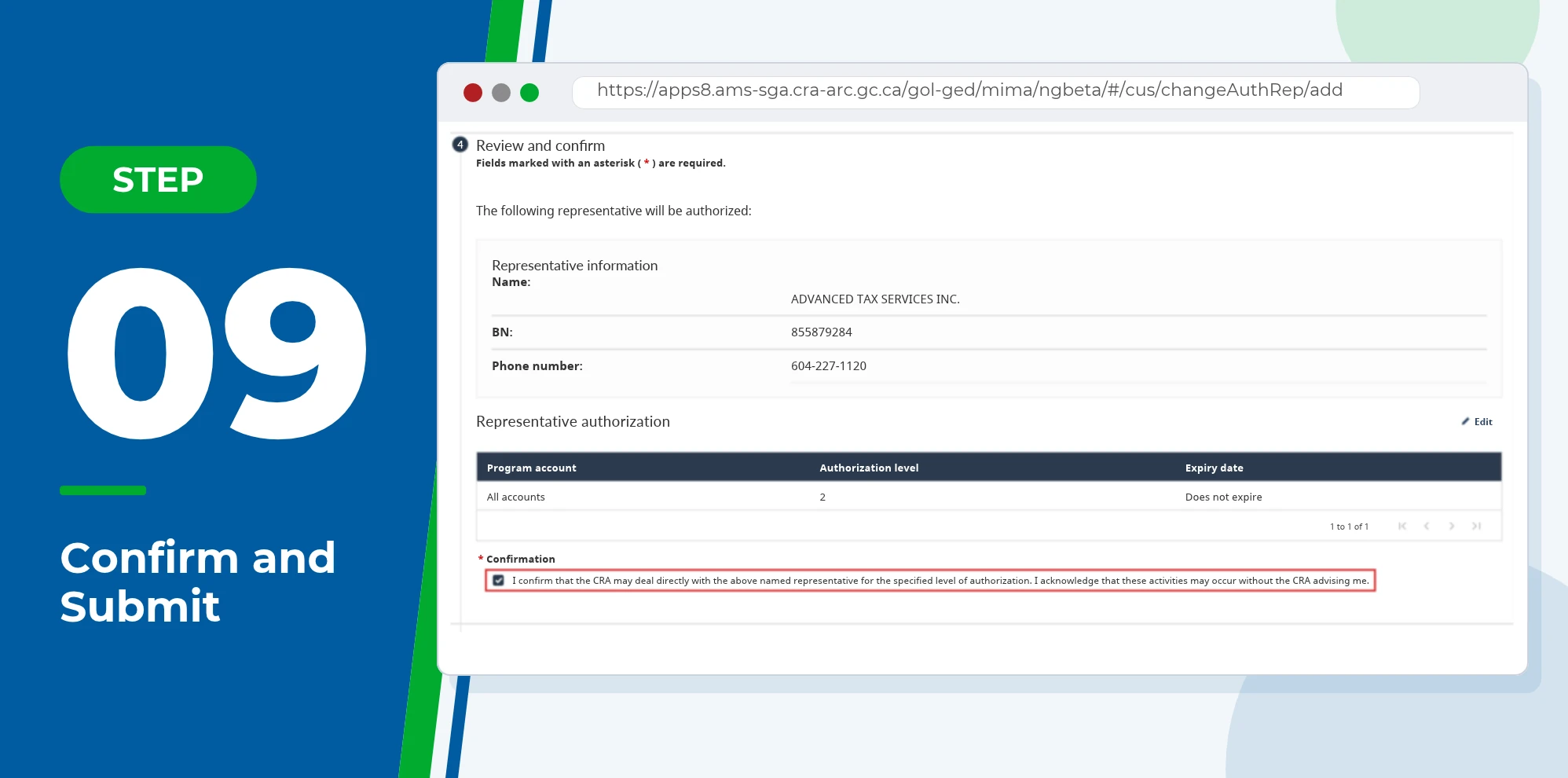
Step 9: Confirm and Submit
You’ll see a summary. Check that it says All accounts, Level 2 and Does not expire, tick the confirmation box and click Submit. Then send us a quick message to let us know it’s done, and we’ll take it from there.
How to Add a Representative to My CRA Business Account
Giving us access to your business works almost the same way as the steps above. The difference is where you sign in: My Business Account instead of My Account for Individuals, which only covers your personal taxes. If you haven’t used My Business Account before, you’ll need to register for it first.
Business accounts are also where the “All accounts” choice in Step 7 matters most. It lets us help with GST/HST, payroll and your corporate tax return without asking you to do this again when you open a new program account.
Running a business on your own? If you file taxes as a sole proprietor, your business income goes on your personal return, so the access you give us in My Account covers it. You’d only add us in My Business Account if you also have GST/HST or payroll accounts.
Not sure which account to authorize us on? Our personal tax accountants can walk you through it on a quick call.
Setting Up a CRA Account (or Giving Access Without One)
Can’t add us through the steps above? You still have options. If you’re partway through registering, finishing it is the best long-term fix. It’s free, and nearly everyone files online now: 95.6% of the 28.5 million returns filed between February 23 and April 30, 2026 went in electronically.
Approve a Request We Send You
If you have a CRA account, we can send you an authorization request through Represent a Client. Sign in to My Account, go to Profile and select Confirm pending authorizations, then choose our name. In My Business Account, go to Profile, then Manage authorized representatives, then Confirm pending authorizations. You have 10 business days to approve it before the request expires.
Use Details From Your Notice of Assessment
No CRA account? We can still request access using details from a notice of assessment you got at least six months ago. The CRA dropped its five-day wait for these requests, so our access starts as soon as the details match.
Mail Form AUT-01 (Offline Access Only)
Form AUT-01 is the CRA’s paper option. It only gives offline access, so your accountant can help by phone, mail, fax or in person but can’t see your file online. Mail it to the Canada Revenue Agency mailing address for your tax centre, listed on the form, within six months of signing it.
What about a general letter giving your accountant permission? On its own, it won’t get them into your file. If you can’t register or share your notice details, we may ask for your signed consent and upload it through Represent a Client instead. The CRA may call you to confirm.
How to Check or Cancel Your Accountant’s Access
Curious who can see your file right now? Go to Profile in My Account and look under Authorized representatives. We suggest a quick look each spring when you file, or any time you switch accountants or a family member stops helping with your taxes.
Removing someone takes a minute: select their name, choose Delete and follow the prompts. Their access ends as soon as you finish online. Calling the CRA at 1-800-959-8281 or mailing Form AUT-01X works too, just more slowly.
Why bother? The Privacy Commissioner’s May 2026 report found the CRA had confirmed 42,755 breaches of taxpayer information since 2020. That’s a good reason to make sure the only people with access are ones you still work with.
Changing accountants? Add the new one first, then remove the old one. If a CRA letter or a review, like a small business audit, lands in between, someone can still answer it.
Common Questions About Authorizing Your Accountant
Yes, and each one gets their own access level. Say we handle your taxes with Level 2, and your daughter helps keep track of your mail. You could give her Level 1 so she can read CRA letters without changing anything. Each person needs a separate authorization, and removing one leaves the others in place.
Yes. Your CRA account only covers you, so your spouse or common-law partner has to add us in their own account or approve a request we send. It’s worth doing if we file for both of you. Benefits like the GST/HST credit are based on family income, and with access to both files we can sort out letters about them without waiting on either of you.
Yes, but the executor or legal representative goes first. They send the CRA a copy of the will or other legal documents. Once the CRA has processed those, a representative can submit a certified authorization request through Represent a Client. We can then help with the final return and anything left owing.
No. Service Canada’s Consent to Communicate Information to an Authorized Person (ISP1603) covers Canada Pension Plan and Old Age Security files, not your taxes. To let an accountant deal with your taxes, you need to authorize them in your CRA profile, approve their Represent a Client request, or send Form AUT-01. You may need both if someone helps with your pension too.
Get Help From Our CPA Team

Five minutes online can save weeks of back and forth later. Once we’re set up, we can pull your slips, catch missed credits and deductions and answer CRA letters without you passing messages along.
Our CPA team handles personal and business tax affairs for clients across Canada. If you get stuck on any step, send us a screenshot and we’ll help you finish it.
Add our business number, 855879284, in your CRA account today. If you’d like help with your Rep ID setup, book a meeting with our CPA team.